You can give users the write access to an environment in the following two ways:
- Assign roles to the environment and the users assigned to these roles get write access to the environment
- Assign users directly to an environment
Ensure that you provide necessary permissions to the roles assigned to the users.
Assigning Roles
To assign roles, follow these steps:
- Go to Application Menu > Data Catalog > Metadata Manager > Explore.
- On the Explore tab, click an environment tile.
The environment details appear.
- Click Options.
The available options appear.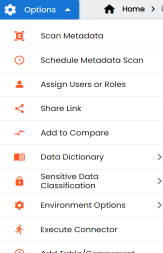
- Click Assign Users or Roles.
The Assign/Unassign Users or Roles page appears. By default, the Roles tab appears.You can click View to view the users assigned to a role.
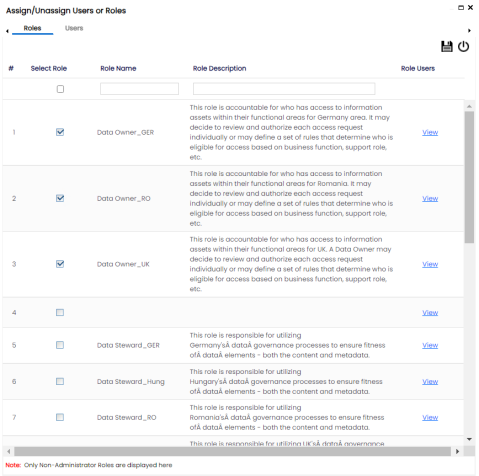
- Select the required roles.
- Click
 .
.
The selected roles are assigned to the environment.
Assigning Users
To assign users, on the Assign/Unassign Users or Roles page, click the Users tab.
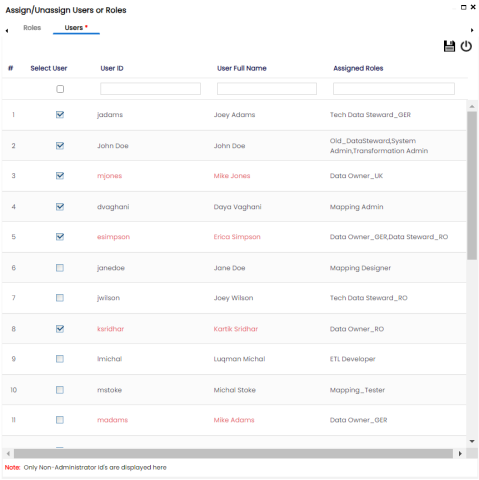
Select the required users and click .
The users are assigned to the environment.